

If you have ADHD and you've chosen a Remarkable, you've already made a strong decision.
The device is designed to remove distraction. No notifications, no apps pulling your attention, no switching between tabs. Just a paper-like screen and a stylus. For many people with ADHD, that environment alone makes it easier to focus and stay present.
But the device itself is only part of the solution.
The built-in templates on Remarkable are very basic. Mostly blank pages, simple lines, or grids. They give you space to write, but they do not give you structure. And for ADHD, structure is what turns intention into action. If you're wondering whether planners genuinely help with ADHD, here's how digital planners support ADHD brains.
Without that structure, it is easy to open the device, write a few notes, and still feel unclear about what to do next.
Why the Default Remarkable Templates Fall Short
On the surface, simple templates seem ideal. Less clutter, fewer distractions.
But for ADHD, too little structure can be just as unhelpful as too much.
A completely blank page creates its own form of friction. You have to decide what to write, how to organise it, what matters most, and what comes next.
That is a lot of decision-making before you have even started.
This is where many planning systems quietly fail. They rely on you to create the structure yourself, when what you actually need is a system that already gives you direction.
What to Look for in a Remarkable ADHD Planner
Not all digital planners work well on Remarkable.
Many are designed for iPad and simply resized. That usually leads to layouts that feel cramped, unclear, or difficult to navigate on an e-ink screen.
If you are choosing a planner for ADHD on Remarkable 2 or Paper Pro, there are a few things that make a real difference.
1. Designed specifically for e-ink
The Remarkable screen is greyscale and has a different feel to a tablet. A good planner should be clean, high contrast, and easy to read without relying on colour. If a planner looks cluttered or hard to follow, it will be harder to use consistently.
2. One clear purpose per page
Each page should tell you exactly what to do. If you open a page and hesitate, the design is not helping you. ADHD-friendly planners reduce that hesitation by making the next step obvious.
3. Built-in time blocking
A simple list of tasks is often not enough. Time blocking gives your day structure by assigning tasks to specific periods. This reduces the mental effort of deciding what to do next and helps you stay on track. For ADHD, this is one of the most important features.
4. Easy navigation with hyperlinked tabs
Scrolling through dozens of pages breaks focus. A planner with hyperlinked tabs allows you to move quickly between sections, which keeps the experience smooth and reduces frustration.
5. A structure that is simple enough to stick to
This is the most important point. The best planner is not the one with the most features. It is the one you will actually use. If a planner feels overwhelming, complicated, or demanding, it will be abandoned. A good ADHD planner should feel straightforward, supportive, and easy to return to — even if you have missed a few days.
Remarkable 2 vs Paper Pro for Planning
Both devices offer the same core benefit — a distraction-free writing environment.
The experience is very similar: no notifications, no apps competing for attention, and a paper-like writing feel.
For ADHD users, this simplicity is what makes the biggest difference.
The key is not the device itself, but what you put on it. A strong planner combined with a distraction-free device creates a system that is much easier to stick with.
A Better Approach to Planning with Remarkable
Planning with ADHD works best when the system reduces effort.
You should not need to think about how to structure your day every time you open your planner. That decision has already been made.
Your job is simply to open the planner, see what matters, and start.
That is what turns planning into something consistent rather than something you try and abandon.
MY PA ADHD Planner for Remarkable
The MY PA ADHD Planner for Remarkable was designed specifically for this.
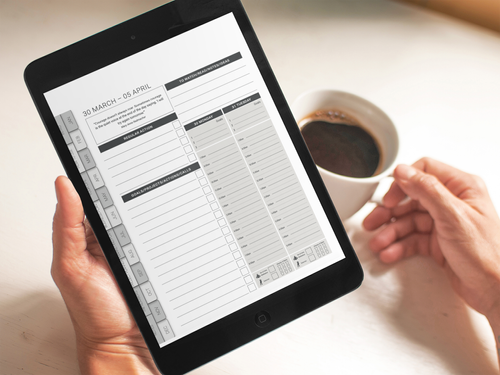
It is built for Remarkable 2 and Paper Pro, with clean layouts that work well on e-ink. Every page has a clear purpose, so you are not left deciding how to use it. Weekly spreads include time blocking, and the review section is structured in a way that helps you reset without feeling overwhelmed.
Navigation is simple, so you can move between sections without breaking your focus.
You can transfer the planner using USB or the Remarkable desktop app and start using it immediately.
Combined with the distraction-free nature of the device, it creates an environment where planning feels straightforward and manageable.
It's also available for iPad and Kindle Scribe if you want to try it on another device. And if you're running a business, the Remarkable business planner adds a full business planning section alongside your weekly workflow.
Choosing a Planner You Will Actually Use
The goal is not to find the most advanced planner. It is to find one that fits how your brain works.
For ADHD, that usually means less clutter, fewer decisions, more structure where it matters, and a system that lets you start again at any point.
When those pieces are in place, planning becomes something you return to, rather than something you avoid.
Explore all our ADHD planning articles for more, or see the full ADHD planning system to understand how everything connects.