
The reMarkable Paper Pure launched on 6 May 2026, replacing the much-loved
reMarkable 2 as reMarkable’s entry-level writing tablet. If you’ve been using a
reMarkable 2 for business planning, or you’ve been waiting for a more affordable
reMarkable before buying, this is the device you’ve been waiting for.
Here’s everything you need to know before you buy, and how to get the most out of it
for business planning.
What Is the reMarkable Paper Pure?
The Paper Pure is reMarkable’s back-to-basics device. No colour display, no front light,
no premium price tag. Just the best paper-like writing experience reMarkable has ever
built at their most accessible price point.
It sits alongside the Paper Pro (11.8 inch, colour) and the Paper Pro Move (7.3 inch,
colour, portable) as the third device in the current reMarkable lineup. The reMarkable 2
is now discontinued.
If you’re new to reMarkable devices, here’s how they compare to Onyx Boox and Kindle
Key Specs at a Glance
• 10.3 inch monochrome display, same size and resolution as the reMarkable 2
(1872x1404, 226 PPI)
• Black and white only, no colour
• No front light, you rely on ambient lighting
• 32GB storage, four times the reMarkable 2
• 50% faster performance than the reMarkable 2
• Up to three weeks battery life
• Weighs 360g, about 40g lighter than its predecessor• Compatible with the new Marker and Marker Plus styluses (not the old
reMarkable 2 pen)
• Starts at $399 / £359
What’s Different from the reMarkable 2?
The screen size, aspect ratio, and resolution are identical to the reMarkable 2, which is
good news if you’re upgrading. Your existing planner files will work without any resizing.
Inside, though, it’s a big step up: faster processor, four times the storage, longer battery,
and a lighter build. It also runs the latest reMarkable software, including calendar sync,
Slack integration, Miro support, and a web app.
One important note for reMarkable 2 owners: your old stylus will not work with
the Paper Pure. It uses the new Marker or Marker Plus pen, not the older Wacom-
based stylus from the reMarkable 2. You’ll need to buy a new pen.
Is It Good for Business Planning?
Yes, and here’s why. The Paper Pure is distraction-free by design. No apps, no
notifications, no temptation to check your email. When you sit down to plan your week,
you’re planning your week, nothing else. For business owners who struggle to focus
during planning sessions, that constraint is genuinely valuable.
The 10.3 inch screen is large enough to use a full A4 PDF planner comfortably, making
it ideal for structured weekly and daily planning layouts. The faster performance over
the reMarkable 2 means loading large planner PDFs is noticeably smoother.
The lack of a front light is the main trade-off. You’ll need decent ambient lighting to use
it comfortably, so it’s less ideal for early morning or late evening sessions in a dim room.
If that matters to you, the Paper Pro is worth the extra cost.
Not sure which planning format works best for your business? This post on digital
planners vs paper planners for business owners covers the honest comparison.
Using the MY PA Business Planner on the reMarkable Paper Pure
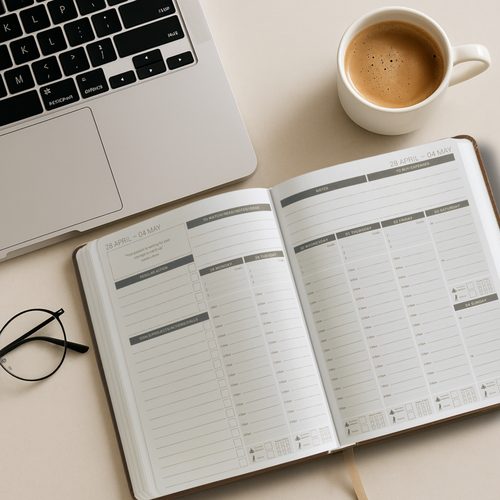
The MY PA Business Planner for reMarkable is fully compatible with the Paper Pure.
The screen dimensions are identical to the reMarkable 2, so the layout, tabs, and page
structure all work exactly as designed.
You can choose between two formats:
• Daily Planner for reMarkable Paper Pure: day-by-day structure with space for
priorities, time-blocking, and notes
• Weekly Planner for reMarkable Paper Pure: broader overview of your week,
ideal for planning sessions on Sunday or Monday morning
Both are available now as instant digital downloads.Pre-order the 2027 edition alongside your 2026 planner and get both for one purchase.
The 2026 planner is available immediately and the 2027 edition will be sent as soon as
it’s ready.
Not sure how to install your planner once you’ve downloaded it? Read the step-by-step
guide to uploading a planner to reMarkable for the full process.
👉Shop the MY PA Daily Business Planner for reMarkable Paper Pure
👉Shop the MY PA Weekly Business Planner for reMarkable Paper Pure
reMarkable Paper Pure vs reMarkable 2: Should You Upgrade?
If you’re already using a reMarkable 2 and it’s working well for you, you don’t urgently
need to upgrade. The screen is the same size and the writing experience is similar.
The main reasons to upgrade: you want the newer software features (calendar sync,
Miro, Slack), your device is slow or ageing, or you want the extra storage and better
battery life.
If you’ve never owned a reMarkable and want to start, the Paper Pure is the best entry
point reMarkable has ever offered.
reMarkable Paper Pure vs Paper Pro: Which Is Right for You?
Choose the Paper Pure if: you want the classic reMarkable writing experience at a
lower price, you don’t need colour, and you plan in normal lighting conditions.
Choose the Paper Pro if: you want colour highlighting in your planner, you need a front
light for low-light use, or you prefer the larger 11.8 inch screen.
For a full side-by-side comparison of reMarkable devices plus Onyx Boox and Kindle
Scribe, read which e-ink device is best for business planning.
Where to Buy
Order directly from remarkable.com. The Paper Pure is available to order now, with
shipping starting in early June 2026.
• $399 / £359: tablet and standard Marker
• $449 / £399: tablet, Marker Plus (with eraser), and sleeve folio in Ocean Blue,
Mist Green, or Desert Pink
The older reMarkable 2 has been discontinued and is no longer available to order from
reMarkable directly.
Start your business without guessing
The Business Starter Kit gives you the plan, the pricing, and one place to run it, so you always know what to do next.
- Clear plan, step by step from idea to launch.
- Price for profit, know what to charge and what you will make.
- One Business HQ, run your entire business from one place from day one.
Start free, then choose the next step when you are ready.