

If you have ADHD and you’ve tried using a digital planner on an iPad or phone, you’ll know how quickly distractions take over. You open your planner, see a notification, check it “just for a second,” and before you know it, you’re 40 minutes deep into something completely unrelated.
This isn’t a lack of discipline. It’s how your brain responds to stimulation.
The Kindle Scribe removes that problem entirely.
No browser. No apps. No notifications. No temptation. Just an e-ink screen, a stylus, and your planner.
For ADHD brains, that simplicity isn’t a limitation. It’s exactly what makes it work.
Why E-Ink Works for ADHD
Most digital devices are designed to keep your attention, not protect it. Bright screens, app switching, notifications, and endless content all compete for your focus.
E-ink is different.
The Kindle Scribe uses a matte, paper-like display that doesn’t emit the same blue light as tablets. It’s easier on your eyes, especially if you plan in the evening, and it doesn’t create the same level of stimulation.
More importantly, the device is intentionally limited.
You can’t jump between apps. You can’t open a browser. You can’t get pulled into something else.
That lack of choice reduces decision fatigue and protects your attention, which is exactly what most ADHD users struggle with.
Why the Kindle Scribe Works Better Than an iPad for Some People
An iPad is powerful, but that’s also the problem.
Even with the best intentions, it’s still:
full of apps
full of notifications
full of distractions
You’re relying on self-control every time you open it.
With the Kindle Scribe, you don’t need willpower in the same way. The environment is already controlled.
That makes it a better option if:
you regularly get distracted on your phone or iPad
you struggle to stay on task once interrupted
you want a more focused, paper-like planning experience
That said, if you rely heavily on colour, apps, or multitasking, the iPad may still suit you better. The key is choosing the environment that supports your brain, not fights it.
Choosing the Right Planner for Kindle Scribe
Not all digital planners work well on the Kindle Scribe.
Most are designed for colour screens, with busy layouts and multiple sections competing for attention. On an e-ink display, this can feel cluttered and harder to use.
For ADHD, that’s a problem.
You want a planner that:
has clean, uncluttered pages
uses clear structure with one purpose per page
includes built-in time blocking
allows quick navigation between sections
If you open a page and feel unsure where to start, the planner is working against you.
A Better Approach to ADHD Planning
The most effective planners for ADHD share a few key principles:
Less choice, not more
Too many options create friction. Simplicity reduces resistance.Structure without rigidity
You need guidance, but not a system that breaks if you miss a day.Time over tasks
Unstructured to-do lists are easy to ignore. Time blocking gives your day shape.Reset, not guilt
A missed day shouldn’t derail everything. You should be able to open your planner and start again instantly.
MY PA ADHD Planner for Kindle Scribe
The MY PA ADHD Planner for Kindle Scribe was designed with these principles in mind.
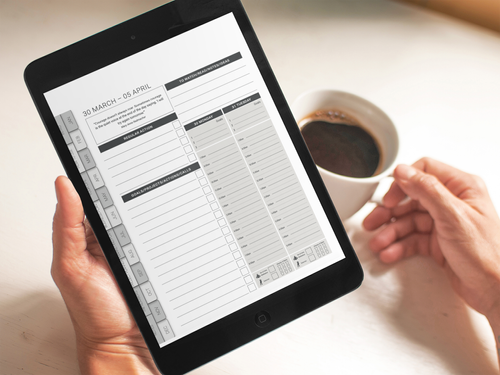
It’s built specifically for e-ink, with clean greyscale layouts that are easy to read and navigate. Every week includes structured time blocking, and the planner is designed to guide your focus without overwhelming you.
You can move between sections quickly, capture ideas as they come, and plan your week in a way that feels simple and manageable.
Combined with the distraction-free nature of the Kindle Scribe, it creates an environment where planning is easier to stick to.
Is the Kindle Scribe Right for You?
The Kindle Scribe isn’t for everyone.
But if your biggest challenge is distraction, and you’ve struggled to stick with planning on more complex devices, it can be one of the most effective tools available.
It removes the noise, reduces decision fatigue, and gives you a clear space to focus on what actually matters.
And for many ADHD users, that’s the difference between planning occasionally and actually sticking with it.
https://www.mypaplanner.com/adhd-planner-kindle-scribe
Main product recommendation
https://www.mypaplanner.com/adhd-digital-planner
After recommendation: "It's also available for iPad and Remarkable."
https://www.mypaplanner.com/kindle-scribe-business-planner
"For business-focused users, see our dedicated Kindle Scribe business planner."